Find the right check for the job
Checks
Look for duplicates, missing details and more. Start with the problem you want to solve.
Choose a check
Most checks use only your catalog and need no setup. A check that needs a file or connection says so below. On the dashboard, Run all checks starts the checks that are ready, within your usage credits. To run a single check, choose Run scan beside it. On Shopify, Shield can rerun your checks weekly or monthly when you turn on rescans in the Shield section of Settings.
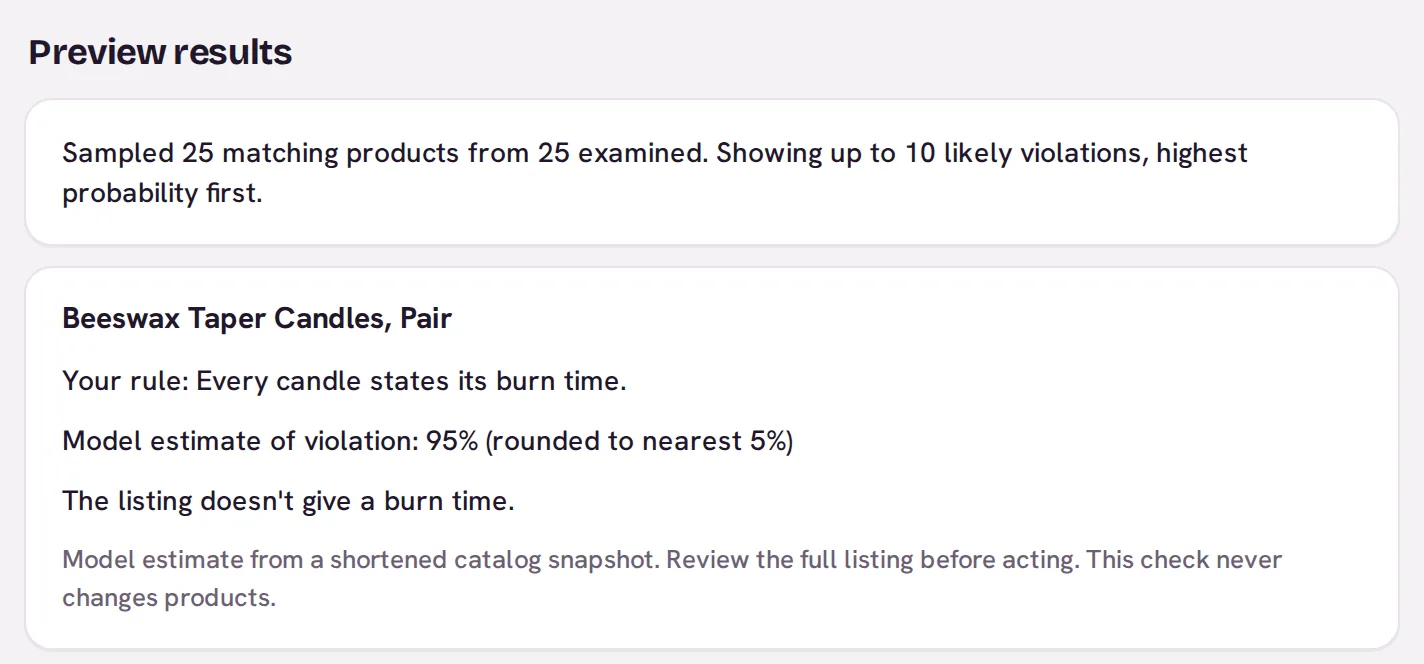
Example rule: every candle states its burn time. Preview shows a sample of likely violations; a clean sample doesn't prove the whole catalog passes.
Browse every check
Duplicates and variants
Duplicate listings · Example
Same mug, two listings
- Listing A
- White ceramic mug · 350 ml
- Listing B
- Ceramic coffee mug · White · 350 ml
Suggested fix
Keep one listing and archive the duplicate, with a redirect.
Accurate listings
Photo doesn't match the listing · Details
What this check looks for
Checks the main product photo for a different kind of product, or a different colour when the product is sold in one colour. Flags for your review only; it never changes your listing. Photos that cannot be read are reported, never guessed.
Needs a readable main product photo.
Attributes and categories
Attribute check · Example
Navy cotton tee
- Color attribute
- Missing
- Catalog color vocabulary
- Navy · Red · White
Suggested fix
Color: Navy. The title supports a value your catalog already uses.
Sales channels and search
Google Shopping rules · Example
Ceramic mug · FREE SHIPPING
- Rule
- Promotional text in title
- Channel
- Google Shopping
What it flags
Google may limit or hide this product. Remove promotional wording from the title.
Competitors
Competitor price matching · Example
Same ceramic mug, matched
- Your price
- $24.00
- Demo competitor price
- $20.00
What it flags
Your price is $4.00 higher. A comparison for review, with no automatic repricing.
Your own rules
Custom checks · Example
Cedar candle
- Your rule
- Every candle states its burn time.
- Listing text
- Cedar-scented soy candle. 200 g.
For your review
Likely rule violation: no burn time stated. Review the full listing; this check never changes products.